Using the |
 |
|
Generic Tool |
No matter what you need to do with your document after it is signed - here is the path to getting it done !
This particular tool is the simplest one in the toolbox, yet it has the potential to do the anything you need to happen to the document after signing.
Basically, all this tool does is pass the name of the signed document to some batch or command file that you specify. It's that simple.
From there - you have full control and can do anything with that file that you can direct a batch file to do, such as place the document in a database.
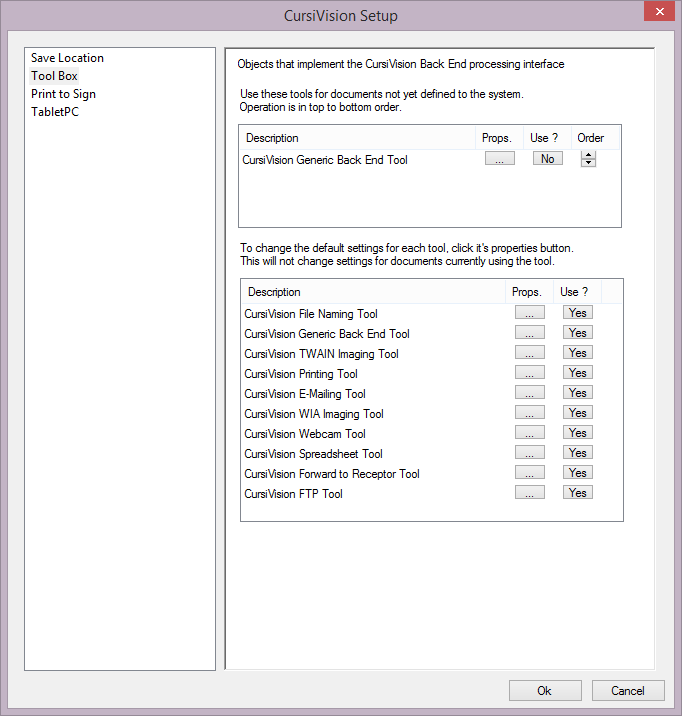
To use the Generic tool, select the Tool Box category from the settings pages, and ensure that the tool is selected into the upper list of tools by clicking Yes for the tool in the lower list.
|
| Figure 1. The Tool Box selection, with the Generic tool ready for use. |
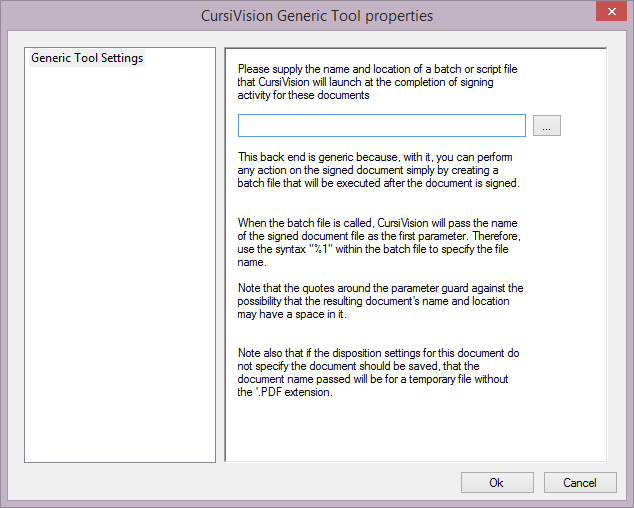
Click on the props button for the tool in the upper list and you will be presented with settings as depicted in Figure 2.
|
| Figure 2. Generic tool properties |
All you need to do is navigate to an existing batch file (.bat or .cmd). When this tool executes - it simply passes the file to the batch file as parameter 1.
Note that this file may be a temporary file if no other Tool has provided a name for the file or saved it anyplace up to this point. Even though such a file does not have a .pdf extension, it is still a valid PDF file.
Usage instruction for other tools from the CursiVision Toolbox can be seen here:
- File Naming tool
- Imaging (scanner) tools
- Printing tool
- E-Mail tool
- Webcam tool
- Spreadsheet Logging tool
- FTP tool
- Forward to Receptor tool