Using the |
 |
|
Forward To Receptor tool |
After the document is signed, it can be sent to another computer for automatic CursiVision activation on that computer.
CursiVision can utilize a special communications protocol designed specifically to transfer documents amongst multiple CursiVision computers in an orginization. You can use this for various purposes described here.
|
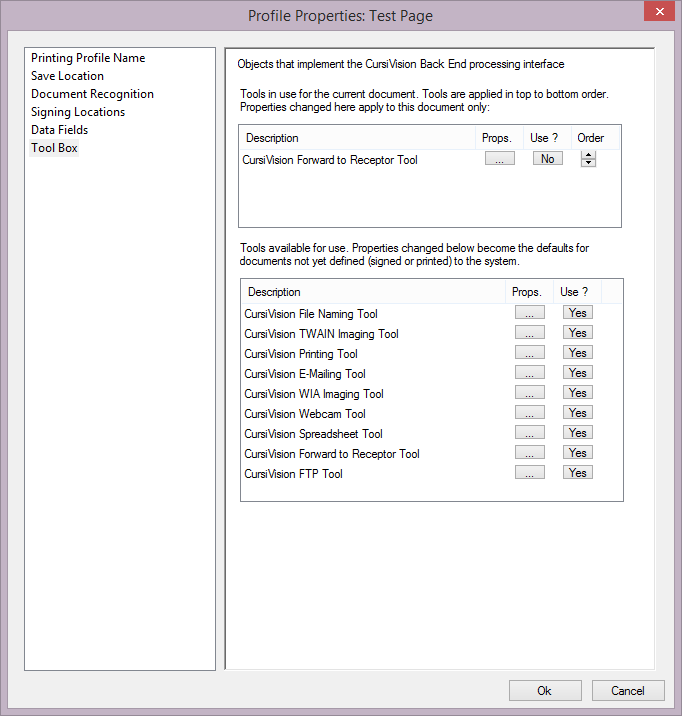
| Figure 1. The Tool Box selection, with the Forward To Receptor tool ready for use. |
Click on the props button for the tool in the upper list and you will be presented with settings as depicted in Figure 2.
|
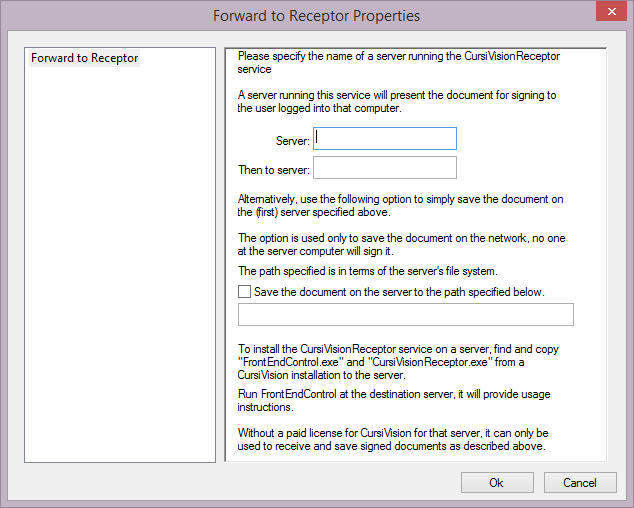
| Figure 2. Forward to Receptor tool properties |
The CursiVision system enables communication among enterprise computers through a windows service specifically built for the purpose. This service, the CursiVision Receptor, listens on a port for incoming requests to transfer a document and launch CursiVision.
Note the settings options shown in Figure 2. These are:
- Server:
This is the target computer. The computer on which these settings are being provided (the client, or signing computer) will send the document, after it has been signed on that computer, to this target server. It uses the standard windows network name for the target, which, of course, must be visible to the client upon tool activation. - Then to server:
After the document is signed on the target server - this option specifies yet another server that that server should send the document to, thus, you can build a short chain of signing activity for a document. - Save the document on the server to the path specified below:
This option enables a special feature that is convenient on networks or in situations where the computer presenting a document for signing may not, or should not, be logged into the local network. For security, or other, reasons it may not be desired to have network drives and resources visible to this computer.
Therefore, you can specify a path, relative to the target server's local drive (or network drive, it can be logged on), upon which to simply save the document. Using this option, you can transfer documents to some privileged location, without necessitating the exposure of the network to the signing computer, which may be, perhaps, a TabletPC in the lobby.
Usage instruction for other tools from the CursiVision Toolbox can be seen here:
- File Naming tool
- Imaging (scanner) tools
- Printing tool
- E-Mail tool
- Webcam tool
- Spreadsheet Logging tool
- FTP tool
- Generic tool